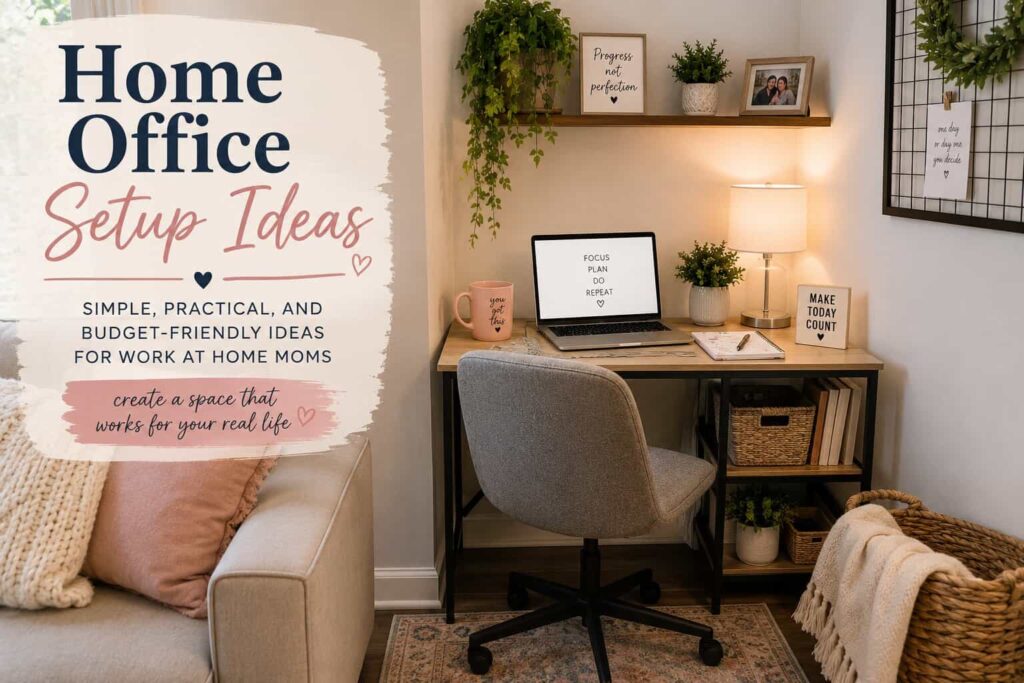
Working from home looks different for everyone, and most of the time it doesn’t look like the perfectly staged office setups you see online. For many work-from-home moms, it’s a mix of kitchen tables, living room corners, and squeezing in focus time between everything else. That’s why these home office setup ideas that work for real life are focused on simple, practical solutions you can actually use—no matter how much space you have or what your day looks like.
Working from home sounds ideal until you’re answering emails at the kitchen table, someone needs a snack, the laundry is buzzing, and you’re trying to remember what you sat down to do in the first place.
The reality is that most work-from-home moms are not sitting in perfectly styled home offices. They are making it work in shared spaces, between interruptions, and with whatever setup they can manage.
The good news is you do not need a dedicated office or expensive furniture to create a productive work-from-home setup. Whether you are working remotely, running a side hustle, building an online business, or creating content, having a functional workspace can make your day feel a lot more manageable.
And that workspace does not have to be a whole room. It might be a corner of your bedroom, part of the living room, or even a setup you move throughout the day.
Here is how to create a home office setup that works for your real life.
Why Home Office Setup Ideas Matter for Real Life
Where you work affects how you work. If your space is uncomfortable, cluttered, or full of distractions, even simple tasks can feel harder than they should.
A thoughtful home office setup can help you:
- Reduce distractions
- Stay more organized
- Feel physically comfortable
- Get through tasks more efficiently
- Create a clearer separation between work and home life
- Actually enjoy sitting down to work
It does not have to be perfect, it just has to support you.
Start With a Plan
Before you buy anything or rearrange furniture, think about what your workday actually looks like.
Ask yourself:
- Will I be on video calls often
- Do I need extra screen space
- Am I mostly writing, designing, or managing tasks
- Do I need storage for papers or supplies
- Will this be a permanent workspace or something flexible
Try to picture a typical workday, interruptions included. That will tell you more than any Pinterest office ever will.
Make a short list of what you truly need, then add extras later if they make your life easier.
Choose the Best Location
Not everyone has a spare room and honestly, most do not.
Look for a spot that gives you at least a little separation from the busiest parts of your home.
Some common work-from-home office locations include:
- A corner of the living room
- Part of your bedroom
- A dining room nook
- A finished basement
- A spare bedroom
- The kitchen table
The best location is not the prettiest one, it is the one where you can sit down and actually focus for more than five minutes.
Create Boundaries Between Work and Home
One of the biggest challenges of working from home is separating work time from family time.
A few simple boundaries can make a big difference:
- Set general work hours even if they are flexible
- Use headphones as a signal that you are working
- Keep your work supplies together in one area
- Let your family know when you should not be interrupted
- Pack things up at the end of the day if your workspace is shared
You will not always get uninterrupted time and that is okay. Having some structure helps you make the most of the time you do have.
Invest in the Home Office Essentials First
You do not need a full office makeover to get started.
Focus on the essentials:
- A reliable computer that can handle your daily tasks
- Stable internet for meetings, uploads, and online work
- A comfortable chair
- Good lighting to reduce eye strain
If your budget is limited, prioritize comfort and function over aesthetics. A cute desk does not help much if your back hurts after an hour.
Focus on Comfort and Ergonomics
It is tempting to work from the couch or bed, especially on busy days. But over time, that can take a toll on your body.
A few small adjustments can make your workspace much more comfortable:
- Keep your screen at eye level when possible
- Sit with your feet flat on the floor
- Use a separate keyboard or mouse if you are on a laptop all day
- Add a cushion or lumbar support if needed
- Take short breaks to stretch throughout the day
You do not need a perfect ergonomic setup, just aim for comfortable enough to work without feeling exhausted.
Keep Your Workspace Organized
Clutter adds mental noise, especially when you are already juggling work, family, and everything else on your to-do list.
Simple organization ideas include:
- Small bins or drawers for supplies
- File folders for important documents
- Desk organizers
- Shelving for additional storage
- Cable management solutions
Spend a few minutes tidying your workspace at the end of each day. Starting tomorrow with a clean desk feels surprisingly good.
Use Tools That Actually Help
There are endless productivity tools available, but more is not always better.
A few popular options include:
- Google Workspace
- Trello
- Asana
- Canva
- Zoom
- Microsoft 365
- Notion
If a tool feels complicated or takes more time than it saves, skip it. The best tools are the ones you will actually use consistently.
Home Office Tips for Moms
Working from home with kids comes with challenges that most office setup guides never talk about.
A few things that can help:
- Keep snacks and water nearby
- Use a rolling cart for supplies if your workspace moves throughout the house
- Schedule focused work during nap time, school hours, or quieter parts of the day
- Keep a basket nearby for kid related interruptions that need attention later
- Give yourself grace when things do not go according to plan
Some days will be productive. Some days will feel chaotic. That is part of the reality of working from home as a mom.
Add Personal Touches
Your workspace should feel like yours, even if it is small.
You might add:
- Family photos
- A plant or two
- Your favorite coffee mug
- A candle or small decorative items
- A vision board
- Inspirational quotes
It does not need to be elaborate, just enough to make the space feel welcoming.
My Home Office Essentials
Over time, I have found that a few items make working from home much easier:
- A reliable laptop or desktop
- An external monitor
- A comfortable office chair
- A planner for keeping track of tasks
- Good lighting
- A quality microphone for meetings and content creation
- Noise canceling headphones
You do not need everything right away. Start with the basics and upgrade your home office setup as your needs and budget allow.
Budget Friendly Home Office Ideas
You do not have to spend a fortune creating a productive workspace.
Try:
- Shopping Facebook Marketplace
- Checking local thrift stores
- Temu
- Amazon during Prime Days or Black Friday
- Repurposing furniture you already own
- Using a folding table temporarily
- Adding pieces gradually over time
- Watching for back to school and holiday sales
Many successful remote workers and business owners started with a simple setup and upgraded as they went.
Frequently Asked Questions About Home Office Setups
What is the most important item in a home office setup
If you are just getting started, focus on a reliable computer, a comfortable chair, and a stable internet connection. Those three things have the biggest impact on your ability to work efficiently from home.
Can I work from home without a dedicated office
Absolutely. Many work-from-home moms work from kitchen tables, living room corners, dining room nooks, and other shared spaces. A dedicated room is nice but not required.
How can I create a home office on a budget
Start with what you already have. Repurpose furniture, shop secondhand, browse Facebook Marketplace, and upgrade gradually as your budget allows.
How do I stay productive while working from home with kids
Create routines and boundaries, schedule focused work during quieter times of day, keep your workspace organized, and communicate your work schedule when possible. Most importantly, give yourself grace when things do not go as planned.
What are the essential home office items for remote work
- A computer or laptop
- Reliable internet
- A comfortable chair
- Good lighting
- A planner or task system
- Headphones for calls and meetings
As your needs grow, you can add items like a second monitor, webcam, microphone, or storage solutions.
What is the best location for a home office
The best location is the one where you can be productive. For some people that is a spare room, for others it is a corner of the living room or even the kitchen table. Focus on finding a space with minimal distractions and enough comfort to work effectively.
Closing
At the end of the day, your home office does not need to look a certain way to be effective.
It does not have to be perfectly organized, fully decorated, or separated into its own room. What matters most is that it supports the way you actually live and work.
Some days your setup will feel smooth and productive. Other days it will be the kitchen table, interruptions in the background, and a to-do list you are just trying to get through. Both are normal.
The goal is not to create a perfect workspace. It is to create a workable one. One that helps you stay focused when you can, flexible when you need to be, and consistent enough to keep moving forward with your goals.
Start where you are. Use what you have. Improve it over time.
These home office setup ideas are not about perfection, but about creating a space that actually works for real life.
And remember, your workspace is just one part of a much bigger picture you are building.